
“Performance Max” can sound like one of those features built to part you from your budget while telling you as little as possible about where it went. Hand Google your money, let the machine decide, and hope for the best. That in addition to the rather over the top name meant many wanted to stay clear, that’s not the case anymore.
Over the past couple of years, Performance Max has quietly become one of the most capable, and surprisingly controllable, campaign types in Google Ads. This guide explains what it is, how it works, where your ads end up, and crucially how much say you actually have over it, all in plain English. If the name has put you off until now, this is the demystifying you have been waiting for.
What is Performance Max?
Performance Max, usually shortened to PMax, is a single goal-based campaign that runs across all of Google’s channels at once. Instead of building separate campaigns for Search, Shopping, Display and YouTube, you create one campaign, give it a goal and a set of creative assets, and let Google’s machine learning decide which combinations to show, to whom, and where.
In other words, you tell Google what a good result looks like, hand over the raw materials, and the system does the heavy lifting of assembling and placing the ads. It is Google’s attempt at a single, unified advertising engine, and for beginners that “one campaign instead of five” simplicity is a big part of the appeal.
How does Performance Max actually work?
It helps to think of PMax as a five-step loop rather than something magical.
- You set a goal. Online sales, leads, store visits or website traffic. Everything the campaign does is optimised towards that goal.
- You provide assets. Headlines, descriptions, images, video and logos. These are the building blocks Google mixes into ads.
- You add audience signals. These are hints, not hard targeting. You suggest the kinds of people likely to convert (your customer lists, website visitors, relevant interests) and Google uses them as a starting point to find similar users faster.
- You make sure conversion tracking is solid. This is the fuel. Without accurate conversion data, the system is guessing.
- The AI takes over and learns. It tests combinations of your assets across channels, serves the ones that perform, and shifts budget towards what converts, improving over time.
The important mindset shift is that you are not setting bids or choosing placements by hand. You are guiding an algorithm by giving it good inputs and clear goals.
Where your ads can appear
The “Max” in Performance Max refers to reach. A single PMax campaign can place your ads across the full spread of Google’s properties: Search results, YouTube, the Display network, Discover, Gmail and Maps. One campaign, the lot.
For a beginner that is powerful, because you get exposure across the entire customer journey without managing six different campaigns. The trade-off, historically, was that you could not see much about which of those channels was actually doing the work. That is the part that has changed most, as we will come to.
Performance Max and the evolution of Smart Bidding
If Performance Max feels like a leap, it helps to see it as the next step in a journey Google has been on for years rather than a brand new idea.
That journey is the evolution of Smart Bidding. Google started by automating bids within a single campaign, with strategies like Maximize Conversions and Maximize Conversion Value, each able to chase an optional Target CPA or Target ROAS. Performance Max takes that same conversion-focused automation and stretches it across every channel at once. Underneath the bonnet, PMax is running Smart Bidding; it has simply been given a much bigger canvas to work on.
So if you are still weighing up manual against automated bidding and finding your feet with the basics, it is worth understanding those foundations first, because PMax assumes you are comfortable letting the algorithm set bids.
Origional Data: Are people using Performance Max?
In general the industry has moved towards it, but making sure you put the best guardrails in place is essential, data from our analysis of Reddit threads found the majority are using but many state that you do need use it with controls:
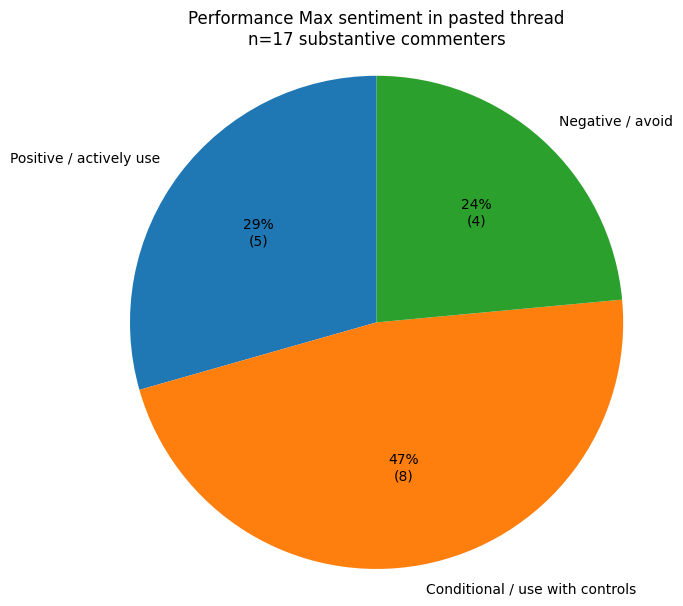
*Data based on AI-powered analysis of 3 PMax Reddit Threads should be used as indicative rather than conclusive.
Is Performance Max a black box?
Here is the part most older guides get wrong. For its first few years, Performance Max was fairly criticised as a black box. You poured budget in, results came out, and you saw very little about where your money actually went.
That criticism no longer holds. Google added more transparency and control to Performance Max across 2025 and into 2026 than in the previous three years combined, and it has kept going. A useful way to picture it: PMax used to be an automatic car with no dashboard. Now it is still automatic, but you finally have a dashboard, brakes and steering.
These are the controls worth knowing as a beginner:
| Control | What it does | Why it matters |
|---|---|---|
| Negative keywords (campaign and account level) | Stops your ads showing on irrelevant searches | Prevents wasted spend, which was previously impossible in PMax |
| Channel-level reporting | Shows which channels drive your results | You can finally see where your money goes |
| Search themes | Guides the AI towards relevant query clusters | Directional control without micromanaging |
| Brand exclusions | Stops PMax serving on your own brand searches | Keeps your reported results honest |
| Asset-level reporting | Shows which headlines, images and videos perform | Tells you what creative to make more of |
| First-party audience exclusions | Excludes existing customers | Focuses budget on winning new customers |
| Budget projection report | Forecasts your end-of-month spend | Helps you stay on budget |
| PMax Experiments | A/B tests changes against your current setup | Lets you test safely before committing |
Google has been adding to this steadily, including first-party audience exclusions and an end-of-month budget projection report built into the campaign. The headline point for a nervous beginner is simple: you are no longer flying blind.
One control deserves a special mention. Brand exclusions stop PMax from serving on searches for your own brand name. This matters because, left unchecked, PMax will happily absorb people already searching for you, take the credit for conversions that would have happened anyway, and make its results look better than they really are. Turning brand exclusions on keeps your reporting honest, so set them early.
How to get Performance Max assets right
Performance Max builds its ads the same way responsive search ads do. You supply a pool of headlines, descriptions, images and videos, and Google mixes and matches them to find the best combinations. That means the same best practices that apply to responsive search ads apply here.
In practice, that means:
- Write several genuinely different headlines and descriptions, each leading with a distinct benefit or angle, rather than slight rewordings of the same line.
- Provide images in every aspect ratio Google asks for, so your ads look right wherever they appear.
- Include at least one video. If you do not have one, even a simple, direct fifteen-second clip is far better than none, and Google can now help generate video assets within the platform.
- Add clear logos.
- Avoid thin or repetitive assets. The more strong, varied material you give the system, the better the combinations it can build.
Think of yourself as stocking a well-organised kitchen. The better the ingredients you provide, the better the meals the algorithm can cook.
Performance Max optimisation tips for beginners
Once your campaign is live, a handful of habits will keep your Performance Max optimisation on track without smothering the automation that makes it work in the first place. Many of these are well covered in dedicated PMax optimisation guides, but the beginner-safe essentials are these:
- Start with a negative keyword list to stop budget leaking into irrelevant searches from day one.
- Set brand exclusions early so your reported results stay honest.
- Feed it strong audience signals, including your customer lists, to give the algorithm a fast, accurate starting point.
- Keep your product feed clean if you are an e-commerce brand, since accurate titles, descriptions and images directly affect relevance.
- Review channel and asset reporting weekly to see what is working, and refine your search themes over time rather than setting them once and forgetting them.
- Track offline conversions if you are a service or local business, so the system understands what a valuable lead really looks like.
- Respect the learning period. Give the campaign a few weeks to settle and avoid constant structural changes, which reset its learning.
When Performance Max is right for you, and when it is not
Performance Max is powerful, but it is not the right first move for everyone. Being honest about that is part of using it well.
It tends to be a good fit when you have reliable conversion tracking in place, you are already running several campaign types you would like to simplify, you have a decent stock of creative assets to work with, and you want broad reach without micromanaging every detail.
It is worth holding off when you need very granular, hands-on control over placements and keywords, when you have too little conversion data for the algorithm to learn from, or when you simply do not have enough creative assets yet to give it room to work. In those cases, building some history with standard Search or Shopping campaigns first is the smarter path.
If you are unsure, the lowest-risk approach is to run Performance Max alongside your existing campaigns and compare the results before moving more of your budget across.
Key takeaways
- Performance Max is a single, goal-based campaign that runs across all of Google’s channels at once, with the AI assembling and placing your ads.
- It is the evolution of Smart Bidding, extending that automation from one campaign to every channel.
- It is no longer a black box. Negative keywords, channel and asset reporting, search themes and brand exclusions now give you real control and visibility.
- Your assets work like responsive search ads, so variety and quality matter. Feed the system well.
- It depends on good conversion data and a learning period, and it is not the right first step for every business.
Frequently asked questions
How does Performance Max work?
You set a goal, upload assets and audience signals, and make sure conversion tracking is in place. Google’s machine learning then tests combinations, serves the best performers, and shifts budget towards what converts.
Does Performance Max use Smart Bidding?
Yes. It is built on Smart Bidding, using Maximize Conversions or Maximize Conversion Value with an optional Target CPA or Target ROAS, and extends that automation across every Google channel.
What assets do I need for Performance Max?
Several distinct headlines and descriptions, images in all aspect ratios, at least one video, and your logo. Google mixes them like responsive search ads, so variety and quality matter.
When should a beginner use Performance Max?
When you have reliable conversion tracking, decent creative assets and want broad reach without micromanaging. If you have very little data or very few assets, build some history with standard campaigns first.
How long is the Performance Max learning period?
Usually the first few weeks. Avoid frequent structural changes during this time, as they reset the algorithm’s learning.

