
Getting your budget forecasted accurately is one of the most important parts of running an effective Google Ads campaign; no one wants to have that conversation with a client or manager about why a campaign has run away with your spend, or why you suddenly need to increase budgets within the quarter. This guide has been developed with the help of the Varn paid media team to help you effectively forecast your budgets.
Expect to learn about different methodologies when it comes to working out how much money you need to spend, why you should consider your POAS in addition to your ROAS, and you can also download our Google Ads budget forecasting template to get started.

Forecasts can sometimes feel uncomfortable particularly in the digital world where trends and seasonality can have drastic and immediate effects, but they are important for accountability and benchmarking. What gets measured gets managed, and if changes happen in the industry, re-forecasting is a powerful tool in the toolbelt.
David Foy, AdPilot Content Manager
Why Google Ads budget forecasting is harder than it looks
One of the easiest parts of Google Ads budgeting to misjudge is the daily budget itself. It is not a strict daily cap, but an average amount Google can use across the month. That means a campaign with a £100 daily budget could spend up to £200 on a busier day if Google sees stronger opportunity, while quieter days may spend less.
Over a month, Google works from an average month length of 30.4 days, so that same £100 daily budget would translate to a monthly spend limit of around £3,040. This is why a reliable Google Ads budget forecast needs structure: it should account for daily fluctuations, monthly limits and the difference between planned average spend and actual day-to-day delivery.
The inputs you need before you forecast
You get out what you put in, so you need to make sure that you have all of the variables to hand before you can effectively put together your forecast:
| Variable | What it means | Where to get the data |
| Target monthly budget | The total amount you plan to spend on Google Ads each month. If you are working backwards, you can instead start with a target number of conversions or a target CPA. | Your internal marketing budget, sales targets or previous monthly ad spend. |
| Average CPC | Your average PPC cost per click. This shows how much you typically pay each time someone clicks on an ad, and it is one of the core inputs for estimating traffic from your budget. | Historical Google Ads data, Google Keyword Planner or benchmark CPC data for your target keywords. |
| Expected conversion rate | The percentage of ad clicks that are expected to turn into leads, sales or another target action. | Google Ads conversion data, GA4, CRM data or landing page performance reports. |
| Average conversion value / AOV | The average value of each conversion. For ecommerce, this is usually the average order value. For lead generation, this may be an estimated lead value based on close rates and customer value. | Ecommerce platform data, CRM data, sales reports or revenue tracking in Google Ads/GA4. |
| PPC bidding approach | The bidding strategy used to control how Google enters auctions and optimises spend. This can affect CPCs, impression share, conversion volume and how quickly the budget is used. | Current Google Ads campaign settings, PPC bidding strategy reports and performance history. |
| Attribution and seasonality considerations | Adjustments for how conversions are credited and how demand changes across the year. For example, peak trading periods may increase CPCs and conversion rates, while attribution windows may delay reported results. | Google Ads attribution reports, GA4, seasonal sales data, YoY performance trends and campaign calendars. |
Step-by-step: how to forecast your Google Ads budget
A Google Ads budget forecast works best when it follows a clear process. Rather than starting with a daily budget and hoping it delivers enough leads or sales, you need to work through the relationship between spend, clicks, conversions and commercial return.
1. Set the goal first
Start by deciding whether your forecast is spend-led or target-led.
A spend-led forecast starts with a fixed monthly budget and estimates what that budget could deliver. For example, you may have £3,000 per month available and want to understand the likely number of clicks, conversions and sales.
A target-led forecast works backwards from a business goal. For example, you may need 100 enquiries per month at a target CPA of £50. In that case, your forecast should show whether the required spend is realistic based on your average CPC, conversion rate and expected lead quality.
2. Gather your historical data
Use your own account data wherever possible, as this will usually give the most accurate view of likely performance. Look at recent Google Ads data for average CPC, conversion rate, CPA, impression share, conversion value and ROAS.
If the account is new, use Google Keyword Planner, industry benchmarks or data from similar campaigns as a starting point. These numbers will be less precise, so your forecast should include a wider range of possible outcomes.
3. Estimate your clicks
Once you have a monthly budget and an average PPC cost per click, you can estimate how much traffic your ads may generate.
Use the formula:
4. Estimated clicks = monthly budget ÷ average CPC
For example, if your monthly budget is £3,000 and your average CPC is £2.50, your forecast would estimate around 1,200 clicks.
5. Estimate your conversions
Next, apply your expected conversion rate to the estimated click volume.
Use the formula:
6. Estimated conversions = estimated clicks × conversion rate
For example, if you expect 1,200 clicks and your conversion rate is 5%, your forecast would estimate around 60 conversions.
This is where landing page quality, search intent, audience targeting and PPC bidding strategy can all influence the final result. A campaign may generate enough clicks, but if those clicks are not relevant or the landing page does not convert, the budget will not deliver the expected return.
7. Estimate CPA, revenue and ROAS
Once you have an estimated conversion figure, you can calculate the likely cost per acquisition.
Use the formula:
8. Estimated CPA = monthly budget ÷ estimated conversions
Using the same example, a £3,000 monthly budget generating 60 conversions would result in an estimated CPA of £50.
If you are tracking revenue, you can also estimate conversion value and ROAS. For ecommerce campaigns, multiply estimated conversions by average order value. For lead generation, use an estimated lead value based on close rate and average customer value.
For example, if 60 conversions have an average value of £120, the estimated revenue would be £7,200. With a £3,000 ad budget, that would produce an estimated ROAS of 2.4.
9. Convert the monthly target into a daily budget
Google Ads budgets are usually set at campaign level as daily budgets, so you need to convert your monthly forecast into the daily figure you will use in the account.
Use the formula:
10. Daily budget = monthly budget ÷ 30.4
For example, a £3,000 monthly target would convert to a daily budget of around £98.68.
This step is important because Google uses an average daily budget, not a strict daily cap. Some days may spend more than the daily average, while others may spend less, depending on auction demand and available traffic.
11. Build a range, not a single number
A good Google Ads forecast should not rely on one fixed outcome. CPCs, conversion rates, search demand and PPC bidding performance can all change, so it is more useful to create a range of scenarios.
For example, you could build:
- A conservative scenario using a higher CPC and lower conversion rate
- A realistic scenario based on current account averages
- An optimistic scenario using a stronger conversion rate or improved CPA
This scenario-based approach gives you a clearer view of risk and helps set expectations before the budget is committed. It also makes the forecast more useful for decision-making, because you can see what needs to happen for the campaign to reach its target.
Don’t want to build this by hand? Use our free toolkit.
POAS stands for Profit on Ad Spend, and differs from ROAS in that it is a claculation that gives you the estimated profit you are making on each product based on their relative margins. For some products you are happy to spend more and reduce the ROAS because they are highly profitable, and vice versa for others you may want to reduce that marketing cost because the margin is not there. It is a useful mindset to have when it comes to running profitable campaigns.
Forecasting backwards from a target: the target-led method
Not every Google Ads forecast starts with a fixed budget. In many cases, performance-led teams work backwards from a commercial target, such as a required number of leads, a target CPA or a revenue goal.
This is known as a target-led forecast. Instead of asking “what can this budget deliver?”, you start by asking “what level of spend is needed to reach this outcome?”
For example, if you need 100 conversions per month and your expected conversion rate is 5%, you can estimate the number of clicks required:
Required clicks = required conversions ÷ conversion rate
In this example:
100 conversions ÷ 5% = 2,000 clicks
You can then multiply the required clicks by your average PPC cost per click to estimate the budget needed:
Required budget = required clicks × average CPC
If your average CPC is £2.50, the forecast would be:
2,000 clicks × £2.50 = £5,000 monthly budget
From there, you can sense-check whether the required spend is realistic against your available budget, expected CPA and wider business targets. In this example, £5,000 of spend for 100 conversions would produce a forecast CPA of £50.
This method is useful when a business has a clear acquisition target or revenue goal, as it shows whether the current budget is likely to be enough. It can also help identify where performance needs to improve. For example, if the required budget is too high, you may need to reduce CPCs, improve conversion rate, refine PPC bidding or focus spend on higher-intent keywords.
Building scenarios instead of single numbers
A Google Ads forecast should not be treated as a single fixed prediction. PPC performance can shift due to changes in search demand, competition, CPCs, conversion rates, seasonality and bidding strategy. For that reason, it is usually more useful to build a range of scenarios rather than relying on one number.
A simple scenario model should include conservative, expected and aggressive outcomes.
| Scenario | What it means | How to model it |
| Conservative | A cautious view of performance where costs are higher or conversion rates are lower than expected. | Use a higher average CPC, a lower conversion rate, or both. |
| Expected | A realistic view based on current or recent account performance. | Use your actual average CPC, conversion rate and CPA from historical data. |
| Aggressive | A more optimistic view where performance improves through better targeting, landing pages or PPC bidding. | Use a lower CPC, higher conversion rate or stronger average conversion value. |
This approach gives stakeholders a clearer view of possible outcomes. Instead of presenting one forecast that may quickly become inaccurate, you can show what happens if performance is weaker, in line with expectations or stronger than current benchmarks.
For example, the same monthly budget could produce very different results depending on CPC and conversion rate assumptions. A conservative model may show a higher CPA and fewer conversions, while an aggressive model may show stronger ROAS and a lower CPA. Presenting these ranges protects credibility because it makes the assumptions clear and shows that the forecast accounts for uncertainty.
The Scenario Planner tab in the toolkit is designed for this step. Use it to compare different CPC, conversion rate and budget assumptions side by side, then choose the scenario that best reflects your current risk level and growth target.
Original Data: Most common budget over-spending issues
Budgeting issues are never fun; we were curious as to what the most common issues were. Taking to Reddit, we uncovered that of the tracked issues, lack of understanding around monthly budget pacing and budget changes/lack of understanding around learning phases were the most common issues.
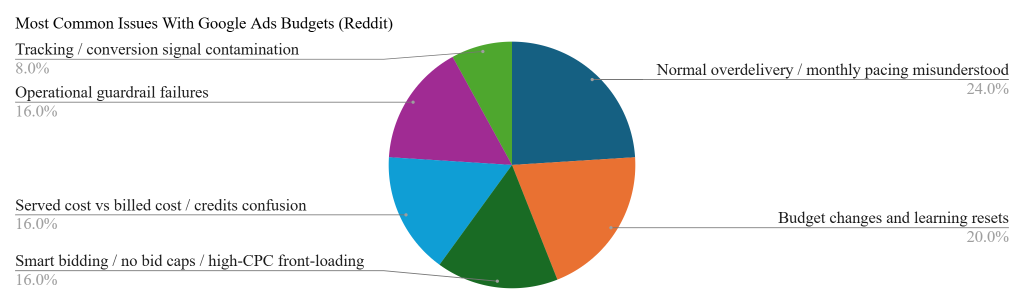
How to avoid the most common forecasting and overspend mistakes
| Issue cluster | Threads | Share | Immediate fix | Prevention |
| Normal overdelivery / monthly pacing misunderstood | 6 | 24.0% | Check billed cost rather than served cost, compare against the monthly cap, and only escalate if actual billed spend breaches the limit. | Set daily budget from the true monthly cap divided by 30.4, and explain to stakeholders that daily spend can vary. |
| Budget changes and learning resets | 5 | 20.0% | Roll back unstable increases if needed, stabilise the campaign, and monitor conversion lag before changing again. | Increase budgets gradually, typically 10–20% every 5–7 days, and use tCPA/tROAS guardrails when scaling. |
| Smart bidding / no bid caps / high-CPC front-loading | 4 | 16.0% | Review bid strategy, search terms, high-CPC keywords and auction data; apply max CPC or portfolio caps where available. | Start tests with stricter bid controls, turn off weak networks where appropriate, and review CPC outliers daily during launch. |
| Served cost vs billed cost / credits confusion | 4 | 16.0% | Use the billed cost report, invoice and transactions page; contact support or dispute billing only if the billed amount breaches policy. | Include served cost and billed cost checks in reporting, and keep screenshots/change history when anomalies appear. |
| Operational guardrail failures | 4 | 16.0% | Pause affected campaigns, review change history/scripts/account access, and set account/order budget limits where possible. | Use account budgets, MCC-level alerts, automated rules/scripts to pause at thresholds, and two-person checks for large budget changes. |
| Tracking / conversion signal contamination | 2 | 8.0% | Fix the tag or primary conversion action, use Data Exclusions for bad data windows, and monitor the following learning period closely. | QA tracking before making it primary, annotate conversion changes, and watch the first 24–72 hours after tracking edits. |
Methodology: The trends above have been put together by analysing 30 of the most highly cited Reddit threads on the subject and using AI to analyse said trends, it gives you a good insight into what other practitioners may be seeing. Data available here.
Key takeaways
- Forecasting is structured estimation, not a guess. Start from your goal: either work forwards from a budget or backwards from a target CPA or revenue figure and build the numbers from there.
- Respect how Google Ads budgets actually behave. Your “daily budget” is an average, your true monthly ceiling is that figure × 30.4, and Google can spend up to 2× it on any single day to chase results.
- Forecast a range, not a single number. Conservative, expected and aggressive scenarios protect your credibility with stakeholders and prepare you for the months that don’t go to plan.
- Set daily budgets from your monthly target (÷ 30.4) and leave them alone. Editing the budget mid-month resets Google’s pacing calculation and is one of the most common causes of overspend.
- Track pacing all month, not just at the end. Monitoring cumulative spend against plan lets you catch overspend or wasted budget early — the free toolkit does this for you automatically.
Frequently asked questions
How do I check a competitor’s Google Ads budget?
You can’t see a competitor’s actual budget as Google doesn’t publish it. What you can do is estimate their spend with third-party tools like SEMrush, SpyFu or Similarweb, view their live ads in Google’s Ads Transparency Center, and use the Auction Insights report in your own account to see how often you compete against them and your relative impression share. Together these give you a directional read on competitive pressure, not an exact figure.
What is a budget in Google Ads?
It’s the average daily amount you’re willing to spend on a campaign. Google treats it as an average across the month rather than a hard daily limit: your effective monthly ceiling is your daily budget × 30.4, and Google can spend up to twice your daily budget on any given day to capture results, balancing it out over the month so you never exceed the monthly cap.
How do I estimate a Google Ads budget?
Work from clicks. Multiply your target number of clicks by your average cost per click, or, if you’re target-led, divide your goal conversions by your conversion rate to find the clicks you need, then multiply by your average CPC. If you have no account history yet, use Google Keyword Planner for CPC and volume estimates, then refine once real data comes in. Our free toolkit does this calculation for you.
How do I change my budget in Google Ads?
Go to the Campaigns page, select the campaign, open its Settings (or edit the budget directly in the budget column), enter the new daily amount and save. Where possible, avoid changing budgets part-way through the month, doing so resets Google’s monthly pacing calculation and can lead to unexpected spend on the remaining days.
When should I increase my Google Ads budget?
Increase budget when a campaign is both flagged as “Limited by budget” and meeting your CPA or ROAS targets — that combination means there’s profitable demand you’re currently missing. Scale gradually, in steps of around 10–20%, and give the system a week or two to restabilise rather than making large jumps that disrupt performance.
What does “Limited by budget” mean in Google Ads?
It’s a status telling you your daily budget is too low to enter every auction your ads are eligible for, so you’re losing potential impressions and clicks. If the campaign is hitting your targets, it’s a clear signal to raise the budget; if it isn’t profitable yet, improve targeting, bids or Quality Score before adding spend.
Why is Google Ads not spending my budget?
Underspend usually comes down to a few causes: bids set too low to win auctions, low search volume for your keywords, targeting that’s too narrow, low Quality Score, ad disapprovals, broken conversion tracking that leaves Smart Bidding without data, or a campaign still in its learning period. Check the keyword status column and Auction Insights to pinpoint which applies.
How do I create a shared budget in Google Ads?
Click the Tools icon, open the Shared library (under “Budgets and bidding” in some layouts) and select Shared budgets, then click the plus button. Name the budget, set the daily amount, add the campaigns you want to share it, and save. Note that shared budgets aren’t supported for every campaign type — Performance Max, for example, uses its own budget.
How do I remove a shared budget in Google Ads?
Because every campaign must have a budget, you can only delete a shared budget once no campaigns are using it. First go into each affected campaign’s Settings and switch it to its own individual daily budget, then return to Shared library → Shared budgets, select the now-unused shared budget and remove it.

